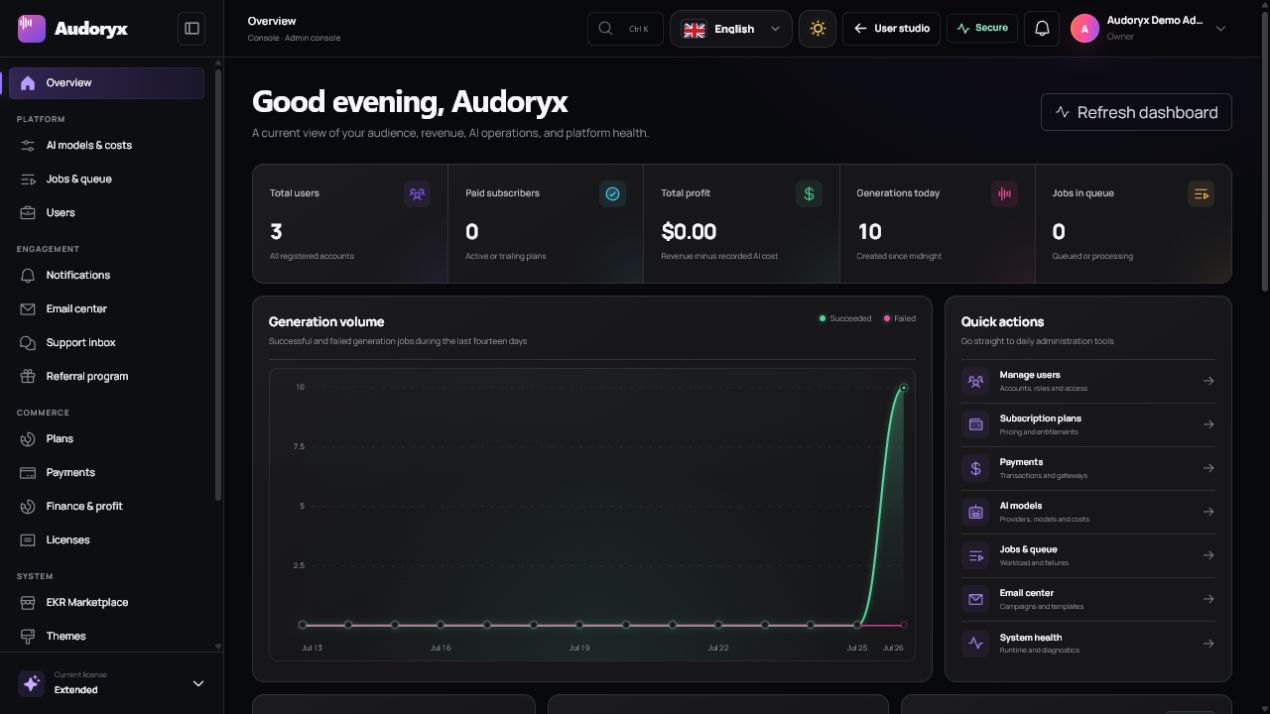
Operate Audoryx with evidence.
The administration console separates platform, engagement, commerce, and system responsibilities. Use the smallest action required, retain audit context, and verify every external side effect.
Dashboard overview
Open Admin → Overview. Treat metrics as operational signals, not provider or accounting statements.
Generation health
Review completed, queued, streaming, and failed activity. A growing queue or provider-specific failure pattern requires investigation.
Commerce
Compare local verified transactions and subscriptions with the authoritative gateway dashboards.
Engagement
Monitor registrations, public creation activity, notifications, support, and referrals without exposing private media.
Alerts
Resolve license, queue, provider, storage, mail, update, and health warnings before they become user-visible failures.
AI models and cost controls
Open Admin → AI models & costs. Model settings determine what users see and how credits are calculated, but provider contracts and actual bills remain external.
- Enable only tested models available to the connected provider account.
- Use accurate provider and display names; never imply affiliation.
- Review credit multipliers and provider cost basis after every pricing change.
- Confirm capability controls against the selected provider and model.
- Save changes individually and run a controlled generation afterward.
Jobs and queue
Open Admin → Jobs & queue to inspect normalized state without relying on a browser tab staying open.
| Signal | What to check |
|---|---|
| Queued too long | Worker process, queue name, scheduler, deployment restart, database/Redis connection, and capacity. |
| Submitted too long | Provider task status, callback reachability, polling schedule, quota, model duration, and provider incident. |
| Failed | Sanitized user error, internal diagnostic, credit refund, provider response classification, and retry safety. |
| Duplicate result | Idempotency key, callback replay, provider task identity, and local result de-duplication. |
| Media unavailable | Download verification, private disk capacity, MIME/size limits, provider URL expiry, and authorized streaming route. |
Do not resubmit a paid provider request after it may have been accepted unless the provider and local workflow guarantee idempotency.
User management
Open Admin → Users. Dedicated create/edit pages expose explicit controls for identity, role, security, defaults, access, and balance.
Create or identify the account
Use a unique email and public username. Upload only an approved avatar and choose the intended locale and appearance.
Assign the minimum role
Standard users access the creator studio. Administrators receive broad system authority. The final active administrator cannot be demoted or suspended.
Apply security state
Set or replace the password deliberately, mark verification only when justified, and record a clear reason when blocking access.
Adjust credits with a reason
Use positive or negative adjustments only for an authorized business reason. Credit-ledger entries are auditable and should not be used to hide billing discrepancies.
Delete only after confirmation
Account deletion removes user-owned creative data while retaining minimized financial and delivery records required for reconciliation. Backups and external providers have separate retention boundaries.
Notifications
Open Admin → Notifications to review operational events or send a verified in-app message. Confirm the intended audience, wording, links, and urgency before submission.
- Use in-app messaging for concise platform actions and status.
- Avoid secrets, purchase codes, private audio URLs, or sensitive account data.
- Review read state and delivery outcome rather than assuming a submitted message was seen.
- Use the Email Center for campaigns that require delivery history or unsubscribe behavior.
Email center
The Email Center separates reusable system templates from campaigns and their delivery history.
System templates
Edit the fixed transactional templates and approved variables. Protected template keys cannot be created or renamed from the interface.
Campaigns
Create a draft, choose an audience, preview its resolved count, review content, and schedule/send through the queue.
Delivery history
Inspect draft, scheduled, sending, completed, partial, failed, and uncertain-delivery states.
Retry
Retry only recoverable failures. An interrupted SMTP request can have uncertain delivery, so the UI warns about duplicate risk.
Unsubscribe links are signed and campaign deliveries use deterministic identifiers, but SMTP cannot guarantee exactly-once delivery.
Support inbox
Open Admin → Support inbox. Claim or assign a ticket before replying so two administrators do not work against each other.
- Read the full conversation and inspect only the authorized metadata shown in the interface.
- Mark it read and claim/assign ownership.
- Request a sanitized reproduction, version, system health details, and redacted logs when required.
- Reply without asking for API keys, passwords, purchase codes, raw database dumps, or customer audio in an insecure channel.
- Set an accurate status and close only after confirming the outcome.
Referral program
Open Admin → Referral program. Enable or pause invite links and define the exact inviter and new-user rewards.
- Publish eligibility, anti-abuse rules, expiry, and promotional terms.
- Choose rewards compatible with model costs and fraud exposure.
- Audoryx commits attribution and both wallet rewards atomically with unique ledger keys.
- Pausing the program retains prior ledger history.
Additional behavior is documented in the engagement engineering reference.
Content and feature controls
Brand & content also contains feature controls. Disabling an optional area hides or blocks access while retaining its data; it is not equivalent to deleting the feature's records.
- Preview identity and media before publishing.
- Select the target theme before editing theme-scoped landing content.
- Keep legal pages accurate and dated.
- Verify every disabled feature on public, user, and administrative routes.
Language administration
Add/import languages, edit metadata, enable or disable availability, select the default, and edit every translation string in a dedicated workspace. Automatic translation requires the corresponding licensed capability and human review.
System health
Open Admin → System health after installation, deployment, provider changes, mail changes, payment setup, theme changes, or an update.
- PHP, extensions, database, cache, filesystem, and environment match production requirements.
- The scheduler has run recently and queue workers consume all required queues.
- Private media and public assets resolve to their intended disks.
- Provider, mail, license, marketplace, and payment connections are configured and tested independently.
- Application debug output is disabled and secure cookie/HTTPS behavior is effective.
- Clearing cache is used only after configuration/deployment changes and followed by a fresh health check.